TRENDING NOW


1
Make Money Online HilltopAds
Ad networks acts as one of the popular source for blogger or webmasters to make money online. It doesn’t require any specific skills to bag some cash.

 If you have a website with decent traffic, you are good to go with good paying ad-networks that seems promising with their unique feature, relevant ads and timely payouts. We better know, the widely used advertising network is Google’s own AdSense which provides its authority itself. 

As the number of fraudulent activities and spamming has been increased among digital marketers, AdSense became vigorous in banning accounts.

We have seen people blaming Google for terminating their accounts even without knowing their activities that violate AdSense Terms. If you think AdSense is out of reach for you (or you need an alternate earning source), you should definitely look for some best adsense alternative. 

Here in this article, you are going to get introduced with an ad-network that became quite popular among publishers within short time just because of their quality ad serving and high payouts.

A Short Introduction

If you are a person having interest in digging the background, you will find out the fact that HilltopAds is fairly new to the market as compared to other ad-network. 
But despite of latecomer, the daily stats tell its success story. Till date, the current stats speaks about their performance. They currently serves around 150 million daily impressions that includes authentic impressions on mobile popunder, mobile banner, regular banner etc..
Below, you will come to know some interesting features of HilltopAds that seems quite promising for publisher traffic monetization.

Why should You Join HilltopAds as a Publisher?

Being a publisher, you want to maximize your revenue, right? You are fed up of Adblocker revenue drop? Disappointed from adsense because your account got disabled.
 Looking to make some extra money by referring your friends. If all these your goal then quickly check out this ad-network features and figure out whether HilltopAds seems reasonable to try once or not?

Save Adblock Revenue Loss with Anti Ad Blocking Solution

Ad blockers are the real pain for website owners, whose income solely depends on display advertisements. These ad blockers hides all display advertising and allows visitors to access website contents without leaving any impression or third party clicks. 
Hence, there is a massive drop in publishers revenue and big disappointment for bloggers or content creators who provides free information with the hope of few penny in return from ads.
Keeping aside all, HilltopAds comes with interesting integration that doesn’t permit readers to get away easily without interacting with relevant ads. 
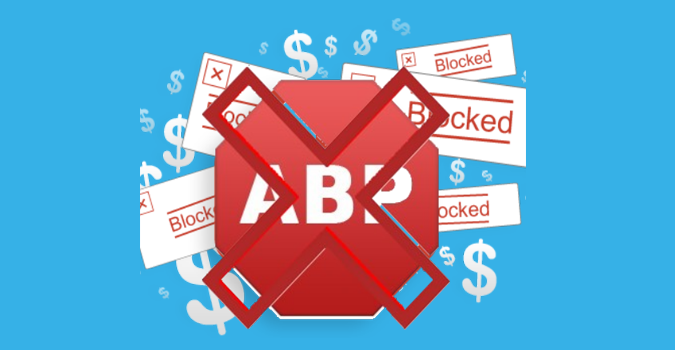
No matter your visitors use ad blockers, despite of that due to strong anti-adblock codes of HilltopAds, your ads always display to your visitors.
Anti Adblock HilltopAds

Zero Transaction Fee

We have seen many payment methods to receive funds. Almost every payment platform charges transaction fee from the fund we receive and in the end we end up worrying about the lost amount. 
You won’t feel disappointed about the whopping transaction fee for the payment from HilltopAds. They will cover all the fees and make sure that you get all the money you earned.
In your account, you need at least $50 to be eligible to get the money. Either you can follow the Net7 payment holding policy or you can set a higher threshold amount.

HilltopAds supports the following payment methods,

  • Bitcoin
  • Paxum
  • PayPal
  • Wire Transfer
  • ePayments
  • Webmoney
  • ePayService

Multiple Types of Ads

You know ad placement has a lot to do with the click through rate. As long as you don’t place the right ads at the right place, you won’t get the maximum CTR and it negatively affects your earning.
To display relevant ads and maximizing profit, you always in need of good ad size option availability. Yes, HilltopAds comes with quite impressive ad format size which helps publishers to chose according to their desire and traffic monetization strategy.
  • Desktop banners 300×250 – invideo, bottom banners
  • Mobile banners 300×250 –footer, header, middle
  • IM (Instant Messenger)
  • Mobile popunder
  • Desktop popunder
  • In-Player ads

No Minimum Traffic or Website Restriction

This is fact that, All website is not same and all don’t have similar traffic. Everyone can’t achieve a million hits on any website within a short span of time. But that doesn’t mean any medium volume traffic or growing website is impossible to monetize. 
HilltopAds’ always looking to accept even growing blogs to serve ads. But you must know that a decent traffic figure (not millions, though) is needed for you to earn a healthy amount every month.
They don’t classify sites and restrict any specific class from serving their ads. No matter which type of site you have (micro niche, gaming, blog, entertainment, news, etc.), all they care about is the quality of the website. Don’t think you can scam them, though the algorithm regularly catches fraudsters red-handed.

Make Extra Money From Referrals

You can earn something extra with the help of HilltopAds’ referral program that pays 5% commission. Once you bring someone to the network (publisher or advertiser), they need to earn or spend money to get you the profit.

Why should You Join HilltopAds as an Advertiser?

An advertiser needs the maximum ROI for their investment. Does HilltopAds provide you with that? Let’s find out,

Real-time bidding system

When you set up an ad campaign, you have to set a bidding amount to start with. Sooner or later, there’s a chance for the targeting keyword (or location) to have higher bids. HilltopAds allows you to change the amount in real-time to ensure you stay on top.

Traffic from Direct Publishers Only

Even though HilltopAds doesn’t follow any strict guidelines for publishers, but they constantly analyze how the publishing websites perform. 
Based on the top performing sites they allow to target and display most relevant ads. So, need not to worry about the traffic sources because the visitors come only from direct publishers.

Advanced Targeting

HilltopAds contains different targeting techniques to get you the maximum leads per visits ratio. You can filter out the global audience on the basis of location, device, searched keywords, browser, etc. and deliver your campaign to the selected ones.
A few more
  • Self service for advertisers
  • Own ad server solution
  • Integration with mobile tracking systems
  • CPM, CPA, CPC, CPO, PPI, CPL payment models

How To Get Started With HilltopAds

Well, you are curious to know how publisher or advertiser can sign up and start making money or run a campaign respectively.
  • First of all, you need to visit signup page.
  • Fill out your details and hit on signup button.
  • You will get a confirmation email link to verify. Check your email and confirm,
  • As soon you finish, you will redirected to the dashboard where it asked to complete your profile details and payment info.
  • For publisher you need to click on “Manage site and Zone” from left menu and complete the publisher application form. Once you will submited then your details will be awaiting approval and someone will contact via Email or Messenger for further help.
  • In few hours, your account will be activated and you are ready to place ad codes.

Final Verdict

Making extra money from blogging is always productive and it become more interesting when affiliate referral revenue going to be included.
 Yes, keeping in mind publishers’ interest HilltopAds comes with variety of payment options, regular payment, referral earning and serves most relevant ads by being a trusted network for both publishers as well as advertisers.

0
How To Check Unfollowers On Instagram

As you all already know that Instagram is a very cool and popular social networking platform. The user can use Instagram either from their website or their smartphone app. 
Generally, most users use Instagram from the app as it has a very nice and clean interface. In Instagram, a user needs to follow other users in order to see the content they post. 
On the other hand, the user on opposite side also needs to follow the user to see the content they post. But some people do not follow back which becomes frustrating as your Following count is greater than Followers count. 
Instagram itself does not let a user to check unfollowers on instagram. We can check see who we are following but followed user is following them or not is not possible. 
As this was becoming a serious issue, programmers and hackers all over the world got to work and designed various methods to check if someone unfollows you on Instagram.

How To Check Unfollowers On Instagram. ?

Method 1:- Use Website To Check Who Unfollowed You On Instagram.

There are many websites available that let you check who Unfollowed you on Instagram. You just need to open up those websites. Log in using your Username and password. 
Give website the permission to check your Instagram account and you are done. Web sites that let you check who Unfollowed you on Instagram are listed below. And they all are free to use.

Crowdfire Website.

There were and still are few websites which can be used to manage your Instagram Account. However, recently due to changes in Instagram API some websites have disabled their service. Unfollowgram and Insta.friendorfollow.com to name a couple of them.
The service which I am going to tell you is still active and works accurately. I have tested it and did the job perfectly. Have a look at the website used and the procedure to use it.
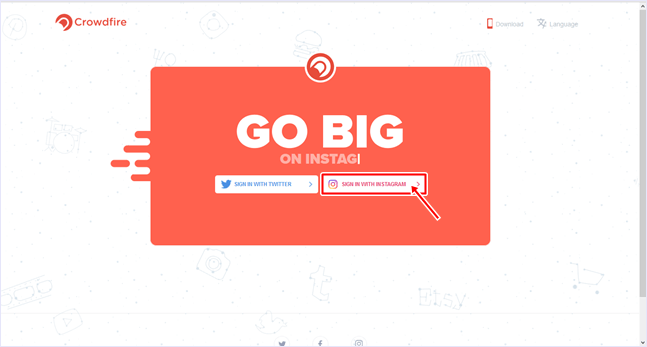
  1. Visit Crowdfire website to check who Unfollowed you on Instagram.
  2. Click on Login With Instagram.
    crowdfire website
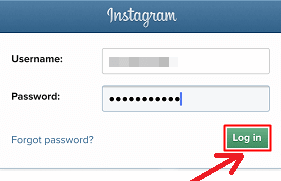
  3. Now you will need to enter your username and password and click Log In.crowdfire web login
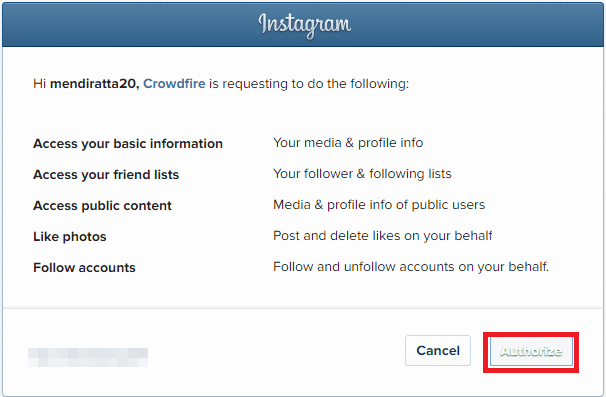
  4. Give access to CrowdFire by clicking onAuthorize.
    authorize app
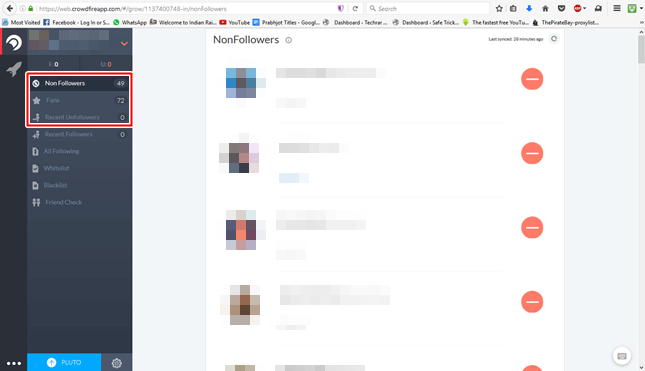
  5. After logging in you can select Non-Followersto see a list of people whom you are following but they are not following you back.
    various tabs
  6. Fans tab will show a list of people who are following you but you are not following them back.
  7. The Recent Unfollowers tab will show a list of people who unfollowed you recently.

Method 2:- Use App To Check Who Unfollowed You On Instagram

As most of the users prefer using Mobile devices rather than a computer for social media, hence I assume that this method will be vastly used. Following are the steps to check who unfollowed you on Instagram using apps.

Crowdfire App

  1. The user needs to download and install AppCrowdFire on your smartphone.
  2. Download Crowdfire app for android by clicking on download button below.
    Download From Playstore
  3. Download Crowdfire app for iOS by clicking on download button below.
    Apple appstore button
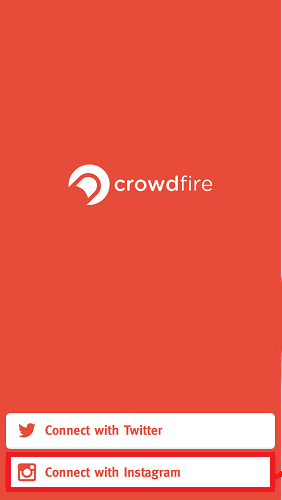
  4. Open the app and select Connect with Instagram.crowdfire app options
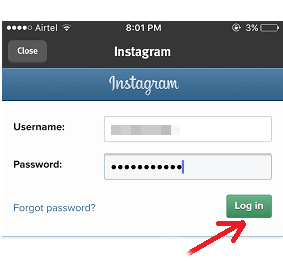
  5. Enter your Username, Password and ClickLogin.
    crowdfire app
  6. Authorize the app if prompted.
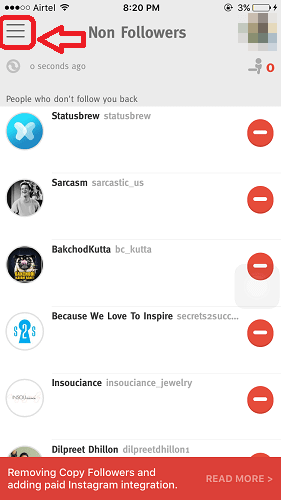
  7. Tap on three horizontal lines at top left corner.
    non followers
  8. Now tap on the desired tab to see the desired list.
That’s it. Now you guys can easily track your followers.
In conclusion, we hope you find this guide on how to check Unfollowers on Instagram is helpful to you. If you have any suggestions or queries, feel free to leave a comment below. If you feel like discussing any other tech stuff or have a request for a tutorial, contact us without any hesitation

Facebook Profile Picture Guard: Here’s How You Can Use It


Facebook Profile Picture Guard: Here's How You Can Use It
Social media giant Facebook had just launched a new feature which is known as ‘Profile Picture Guard’ will restrict other users from downloading and sharing the profile image. This is a great move from Facebook to reduce the misuse of images.

Facebook Profile Picture Guard: Here’s How You Can Use It

If we talk about social media giant Facebook, it doesn’t stop, nor does it stop stagnating. Hence, it constantly presenting and making news to users. Without any doubt, Facebook is the biggest and best social network in the world.
The reason why we are talking about Facebook is that recently the social media giant has introduced a series of changes in its network which aims to protect the profile picture of Facebook users.
The latest feature which is known as ‘Profile Picture Guard’ will restrict other users from downloading and sharing the profile image. This is a great move from Facebook to reduce the misuse of images.

The new tools had been developed in partnership with safe organizations, including Centre for Social Research and Learning Links Foundation in New Delhi.
Here’s how you can use Facebook profile picture guard to stop people from downloading and sharing your pictures:
Step 1. You need to download and install a Facebook mobile app if you already have it on your smartphone then make sure to update it from Google Play Store.
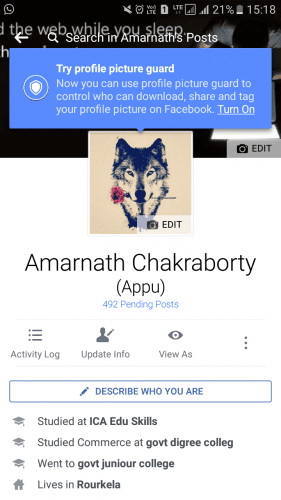
Step 2. Now open your profile in Facebook app and on the top of your profile picture, you will see the option ‘Try Profile Picture Guard’ Click on Turn On.


Facebook Profile Picture Guard

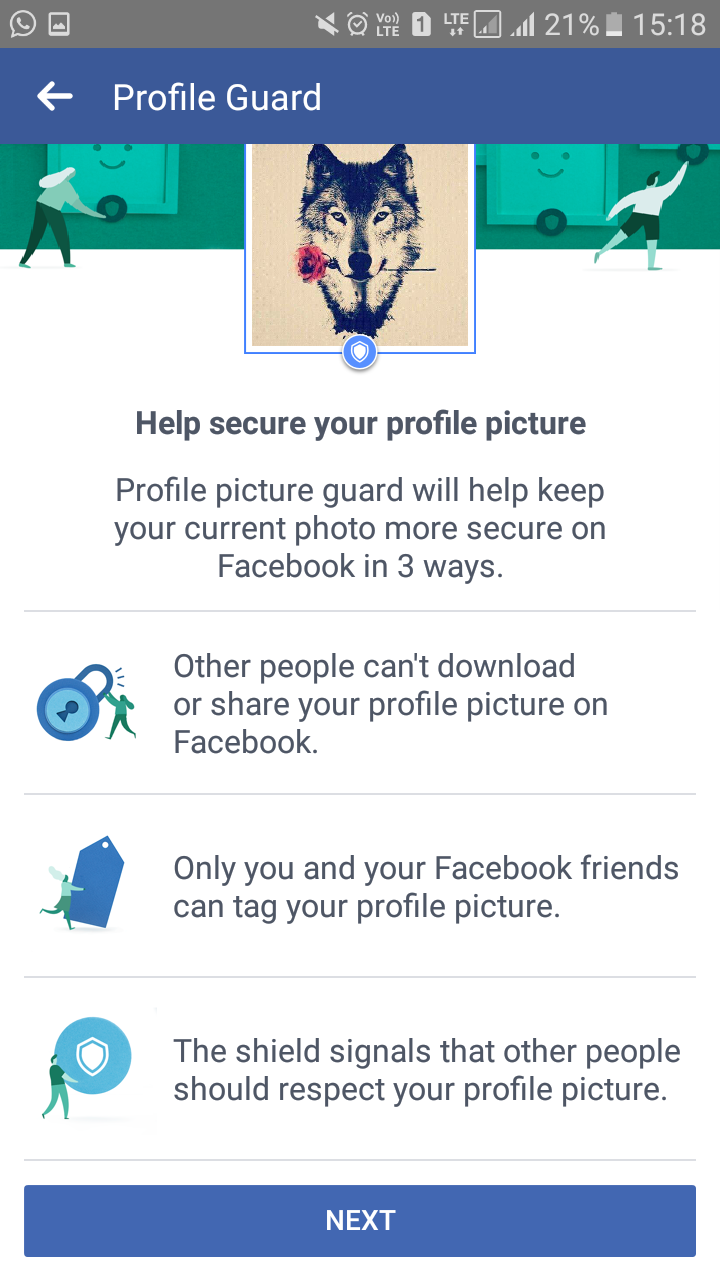
Step 3. Now on the next page, Facebook will tell you about the latest security tool. Simply, tap on the next button to continue.

Facebook Profile Picture Guard

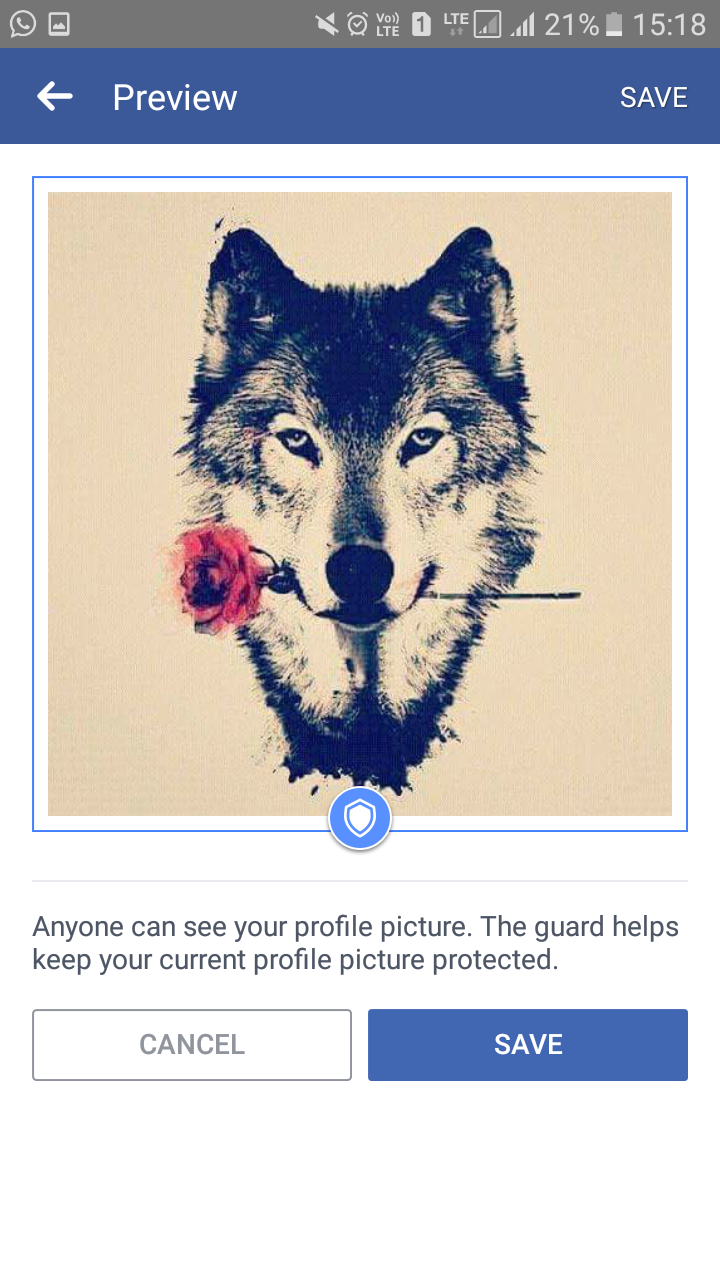
Step 4. Now on the next page, Facebook will show you the preview of your profile picture with a Guard. Here you need to tap on the ‘Save’ button.

Facebook Profile Picture Guard

That’s it! This is what you need to do to make your profile picture safe from others. This is how you can stop other people from stealing your profile pictures.

Facebook Profile Picture Guard
So, what do you think about this? Share your views in the comment box below. 


Nokia To Use Xiaomi's Surge S1 Processor In Its Phones
The return of the Finnish Company Nokia to the market of smartphones, and more importantly, to Android, makes it a brand to take into account. However, now it seems that the Finnish company Nokia will collaborate with Xiaomi simply for using its processor Surge S1 in its devices.

Nokia To Use Xiaomi’s Surge S1 Processor In Its Phones

The next Nokia mobiles are the most expected smartphones of the market. As the return of the Finnish Company Nokia to the market of smartphones, and more importantly, to Android, makes it a brand to take into account. 
However, now it seems that the Finnish company Nokia will collaborate with Xiaomi simply for using its processor Surge S1 in its devices and this was launched for the average range smartphones.
To emphasize in the mid-range simply we not only need a good value for money, but we need to have the most powerful sections of the sector. 
This happened like when we started to seeing fingerprint sensor in all the mobile phones of reduced price ranges, and surely in a few years, we will also see the functions of high-end mobile devices such as Samsung’s iris scanner or LG’s wide-angle in mid range devices. But there are still brands that focus on just making their devices as powerful and fluid as possible.
The Finnish company Nokia this year has demonstrated with the Nokia 3, Nokia 5 and Nokia 6, at least in the mid-range, they simply want to offer excellent performance, betting on powerful hardware and a layer of very fluid personalization to provide category performance. 
The collaboration that will make Nokia is with a fairly similar company, as it has the same strategy: Xiaomi is one of the companies that always seeks to provide best user experience to its users by its layer of customization and hardware, while in other sections like multimedia does not stand out so much.

The next Nokia mobiles would use a processor manufactured by Xiaomi, the Surge S1

A few months ago we told you all about the new Xiaomi processor, the Surge S1, which was manufactured in 28-nanometer technology that was meant for the mid-range devices. 
With this, Xiaomi was entering a market in which there are few manufacturers such as Huawei, Samsung or Apple, which manufacture a processor for their own mobile and can optimize it further in their own way.
 The first mobile to be launched with this processor was the Xiaomi Mi5c, and the next mobile to be launched with this processor, may not be a Xiaomi device.
As Xiaomi and Nokia would have talked to use the processor of the Chinese company in Nokia mobile phones, something that could serve to Xiaomi to continue developing its processor and while going try it and Selling it, while Nokia could make its mobile phones have a lower cost of manufacturing, but does Nokia really win in this switch from Qualcomm to Xiaomi?

The Surge S1 against the competition of Qualcomm and MediaTek

The Surge S1 that Nokia would use – or perhaps new versions of it – competes directly with the Helio P20 and Snapdragon 625, in which it ends up winning the processor of Xiaomi in the cost of manufacture but is not so powerful as the one of Qualcomm.
The next processor of Xiaomi will be manufactured in a technology of 16 nanometers, a processor that could surpass in everything to Snapdragon and the MediaTek.


Samsung Smart Speaker
Samsung  is creating a speaker that will feature the capabilities of Bixby, a voice assistant software that the company is actively developing. Bixby was announced alongside the Galaxy S8 smartphone and was billed as a major feature of the device and Samsung has yet to offer Bixby outside of its home country of South Korea.

Samsung Is Creating A Bixby Smart Speaker Named ” Vega”

We have seen Apple, Amazon, and Google smart assistant and so Samsung has its own Smart speaker on the way.
We had Amazon Echo, then Google Home, then Apple HomePod.Samsung, it seems, is eager to join the list with its own smart speaker powered by the firm’s Bixby AI assistant; the one which debuted aboard the recent Galaxy S8 series of smartphones.

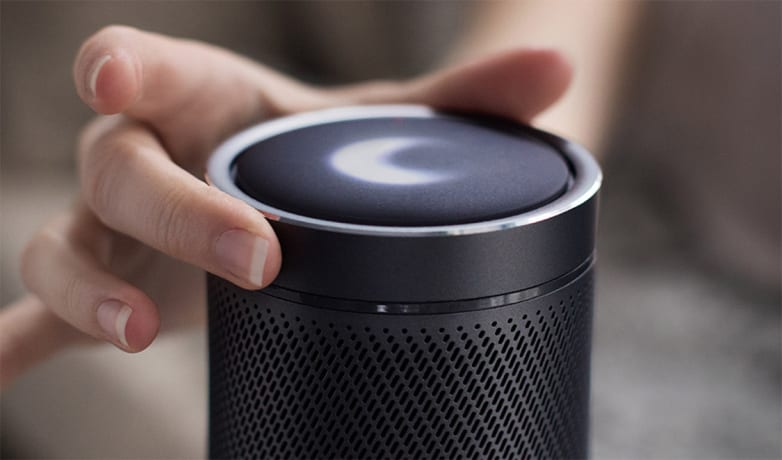
Samsung on the way to launch itys Smart Speaker ” Vega “

In creating a Bixby-powered voice assistant speaker, Samsung is squaring itself against major competitors. Amazon’s Echo line occupies more than 70% of the US market for voice-activated speakers, with new additions to the line frequently added. 
Alphabet has also made inroads with Google Home, which has a features list that grows constantly as the search giant expands its capabilities. Microsoft and Apple both have plans for upcoming voice-activated speakers, creating a tough market for Samsung to break into.

The word comes via the Wall Street Journal, which claims the project has been under development for a year already. Internally, it’s referred to as “Vega”, like the masked character from Street Fighter, but whether that name will suit the final product, or whether it’ll more prominently incorporate the Bixby name first and foremost, remains to be seen.
Related image
Samsung Bixby
Apparently, a big question mark remains over a possible release in no small part due to the fact that the full English-language rollout of Bixby – for its Galaxy S8 phones –  has been delayed. Current Galaxy S8 owners in some regions can use Bixby, but with very limited functionality, and an absence of voice control functionality.
So, guys whats your thought on this? do tell us in the comment section below. Thanks for reading this article and we hope you have a great day.

In the era of smart technology, we are using several media including videos every day. There may be many occasions when we faces poor internet connectivity or network issues even once we go to some remote areas.

 In case, if you planned to watch some online YouTube videos during remote area visits then it won’t possible due to heavy buffering. If you are well aware of such issues then you can plan to download your favourite videos right before the trip.

 In this way, you will have access to your favourite movies, music or any videos even in no internet access. Well, here i am going to share a user friendly YouTube video downloader for android which comes with cool interesting features that we see in detailed below,


Quick Introduction

I am sure you might be thinking, why to download any video even we can watch streaming videos online without any hassles. So, Why to choose any YouTube video downloader? Yes, this is very logical point and below i am going to clear this with a short insight.

You may know that, online streaming videos app won’t work in poor internet connection. Apart from it, among several online video portal like dailymotion, vimeo, hotstar etc.. 
YouTube is much popular and seems to have maximum daily users than its competitors. You might subscribed many channels and addicted to watch your favourite videos even once in a day. 

But when it comes to download, YouTube won’t allow due to its several terms. So, in such cases apps like KeepVid Android App will help you to download YouTube videos quickly.
KeepVid Android app is not just app but you can say it is multi-functional app. For an example, YouTube video to audio conversion, Online Video conversion, YouTube videos to MP3 Songs conversion and downloading of videos from many popular sites can be done easily and effectively.

How To Use KeepVid

According to the KeepVid, their app is only available for Android users as for now. So if you are android user then you can download KeepVid android Apk directly from the official website.
 The app is absolutely free to download but unfortunately you can’t find on Google PlayStore. So you need to download it from the website only.
As soon you finishes the downloading process, the next step is of installation. In case, if your device shows installation blocked for some reason, then simply need to enable from the setting. 
Here is the step: Setting > Security > Unknown Sources, and enable the option. Once the app is installed, you are set to go for downloading videos from YouTube and 30+ other supported sites like Facebook, Instagram, Vimeo, SoundCloud etc..

Key Features of KeepVid Android App

1. Download YouTube Videos Into MP3

There are many instance when you prefer MP3 musics over watching video. So, KeepVid android app allows you to download YouTube videos in MP3 format so you can listen your favourite music or podcast without any hassle.

2. Ease Of Video Sharing

It becomes habitual to share any interesting videos or music among friends and family circle. Almost, all social networks or video sharing platform allows to share any video. 
So, at KeepVid you can enjoy that option too because sharing facilities helps to improve user engagement with better personal experience.

3. Copy and Paste the Link

As common daily practice to copy any link from website and paste it in other website or app to download video. 
So, KeepVid also provides that ability to do the same for downloading any video. You just need to copy and paste the required link and rest of the work will be done by KeepVid.

4. Multi-Tasking Application

If I ask you to download your favourite videos one by one then you may fed up? You are smart enough to save your precious time with multi tasking.
 Yes, KeepVid Android app developed while keeping in mind better user experiences and it allows multiple downloads at a time. But to be notice, through KeepVid you can download 5 videos at a time which is not a bad number.

5. Built-in Web Browser and Video Search Option

The app comes up with Built-in Web Browser that you can use to find your favourite video from YouTube or alternatives. 
You can open any website with this browser and start downloading the video. In case, if there is a running video on the page then this app will detect it and share the downloadable link.

Final Words

No doubt, KeepVid Android App is one of the good option to download videos from wide range of sites. Due to the impressive features and good user experience, it seems recommendable to try at least once.
 Apart from all above features, KeepVid also allows users to download any video into directly MP4 format. So, you need not to use any video converter tool for such process.

How To Use Google As Proxy Server In 2 Different Ways


Google as proxy server
If you are having trouble reaching a web page, because the website is blocked at your workplace, or because this page is behind a paywall, there are some non-certified Google proxy servers that help you read that page. follow the below methods to access blocked content using Google as a proxy server.

How To Use Google As Proxy Server

Many times you come to situations in schools, colleges or offices where access to certain websites is blocked. There can be valid reasons for blocking them. But, what if you need to send an important mail and find out that all the mailing services are blocked, you will be stuck yourself badly.
 But, this will not be the case if you know how to use Google services in the form of a proxy server, it takes few sec to bypassed paywalls, blocked a website or downloading files.

How To Use Google As Proxy Server To Access Blocked Content.

As stated above, there are two ways to use Google as a proxy server. While your ISP or public network host will think you are using a Google service, your screen will actually show the original content of the blocked website.
 Let us begin with the Guide to using Google as a Proxy Server to access Blocked Content.

Method 1: – Google Weblight.

Google weblight is a Knowledge saving method utilized by chrome net browser. It routes your net web page by means of Google’s personal servers the place it’s optimized for low knowledge and fast loading. 
This modifies your URL and therefore blocking packages cannot recognize the content material. This technique to make use of Google because the proxy server could be very fast and efficient. Simply comply with the straightforward steps given under to make use of Google as a Proxy server and entry blocked content material utilizing google weblight.
  • Enter the URL of the blocked content material within the format given under.
“http://googleweblight.com/?lite_url=http://*URL-HERE*”
  • Substitute URL HERE together with your URL.
we have replaced ” http://googleweblight.com/?lite_url=https://techviral.net “

Method 2: – Google Translate.

This technique includes using Google’s web site translator service to bypass blocks and entry blocked content material through the use of Google as a proxy server. 
Google has the facility to open any web site and translate its content material to any of the supported language. 
This can be utilized to point out the complete web site on the display by way of Google translate. Right here’s how to take action.
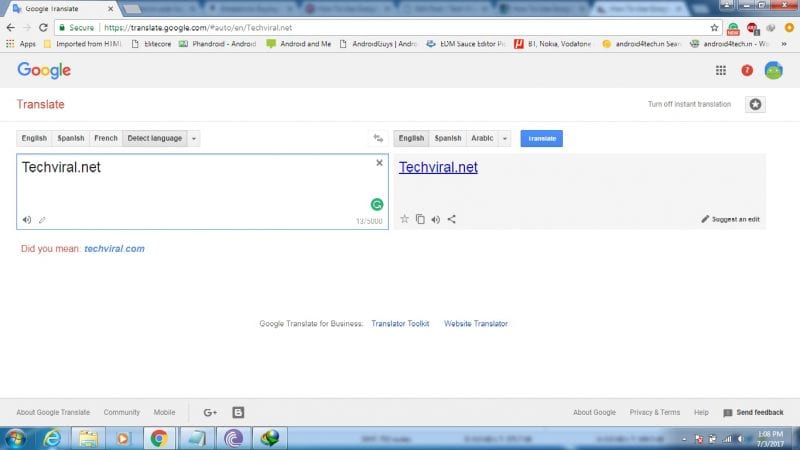
Step 1. Go to https://translate.google.com and within the textual content field, paste the URL that you simply need to go to.
Here We Translated ” https://translate.google.com/#auto/en/Techviral.net “
Step 2. Select any language aside from the language the online web page is in.
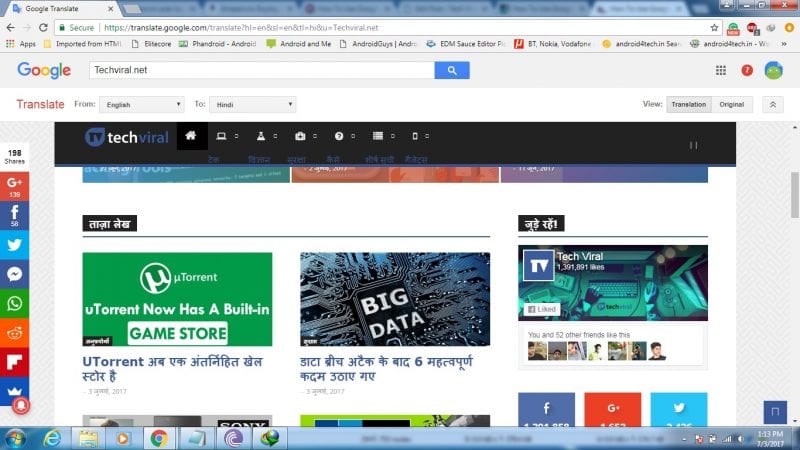
Step 3. Click on the “Unique” button within the prime proper nook to view the unique net web page.
Here we have translated the whole web page to Hindi from English
Hence, This is how you can use Google as a proxy server using Google Translate service.
So, guys hope you liked it if you do share this article and comment your thoughts in the comment box below. Thanks for reading our article and we hope you have a great day.
How To Check What Kind Of Processor Your Android Device Have 

Here is the guide to Check What Kind of Processor your Android Device Have that will help you in deciding numerous things while going for your device customizations, SO follow the tutorial to proceed.


How to Check What Kind of Processor your Android Device Have


With the release of Android Lollipop version the root apps like Xposed Framework have got up their rigid compatibility requirements for the processor and for every other processor with even different builds, there is need to install up to the different version of that app.
 This makes it greatly important for the users to know about the exact architecture of their Android device processors and then only they could begin to go for installing the accurate app. 
The Android by default would not provide as much information regarding the processor on which it is running so some external method is to be applied for knowing the better detailing of the processor. 
Here in this article, we have discussed the way through which you could be able to know about the exact processor that your Android device is been integrated of and also get out some more information regarding the hardware of your device.
 If you also wish to know about the total processor hardware information on your Android device then simply follow up the article and hence learn those geek techniques. Now it’s time to go for those ways and the article so just go and read it up now!

How to Check What Kind of Processor your Android Device Have

The method is quite straightforward and easy, and you just need to follow the simple step by step guide discussed below to proceed.
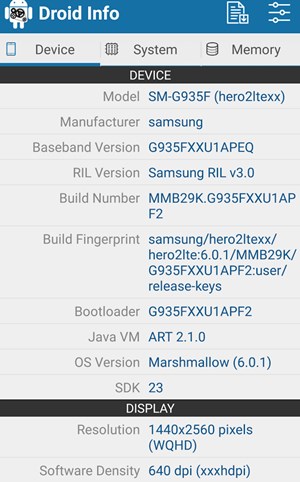
#1 First of all download and install the app named Droid Hardware Info from the Google Play Store. Just search for this app and then click on the install button aside to it to start the installation process, after that let the app be downloaded and installed. Some permissions would be asked before you start to install the app just grant all those and move right away with the installation.
#2 Open the newly installed app and inside the app head towards to the System tab and you would see there the two fields named CPU Architecture and Instruction Sets. Open up these fields and surf through these, you would get much much information regarded to the processor but you might not be able to read it as such. Just follow up the method and we would help you decode that information of your Android device processor.

Check What Kind of Processor your Android Device Have

#3 Essentially the ARM: ARMv7 or armeabi, ARM64: AArch64 or arm64 and the x86: x86 or x86abi is the decoded information for your processor architecture that you might be looking for. Some of the other information is too listed with the app which you could easily use to narrate the full hardware information of your device processor!

Check What Kind of Processor your Android Device Have

After reading up the above article you have now got the simple way through which you could be able to know about all technical information about your processor on the Android device.
 This information you get could be useful to you for knowing about the quality of the device and it’s performance factors etc during the buying of any new device. 
If you are getting any issues regarding the grabbing of your processor on Android device then please comment for that, we would love to help you out!

Top Ad unit 728 × 90

Back To Top